
I wanted someone watching my Twitch stream to type a phone number into a box under the video and land on my Laylo drop list, without opening a new tab. The code took one evening in September 2026.
A link was the cheap version
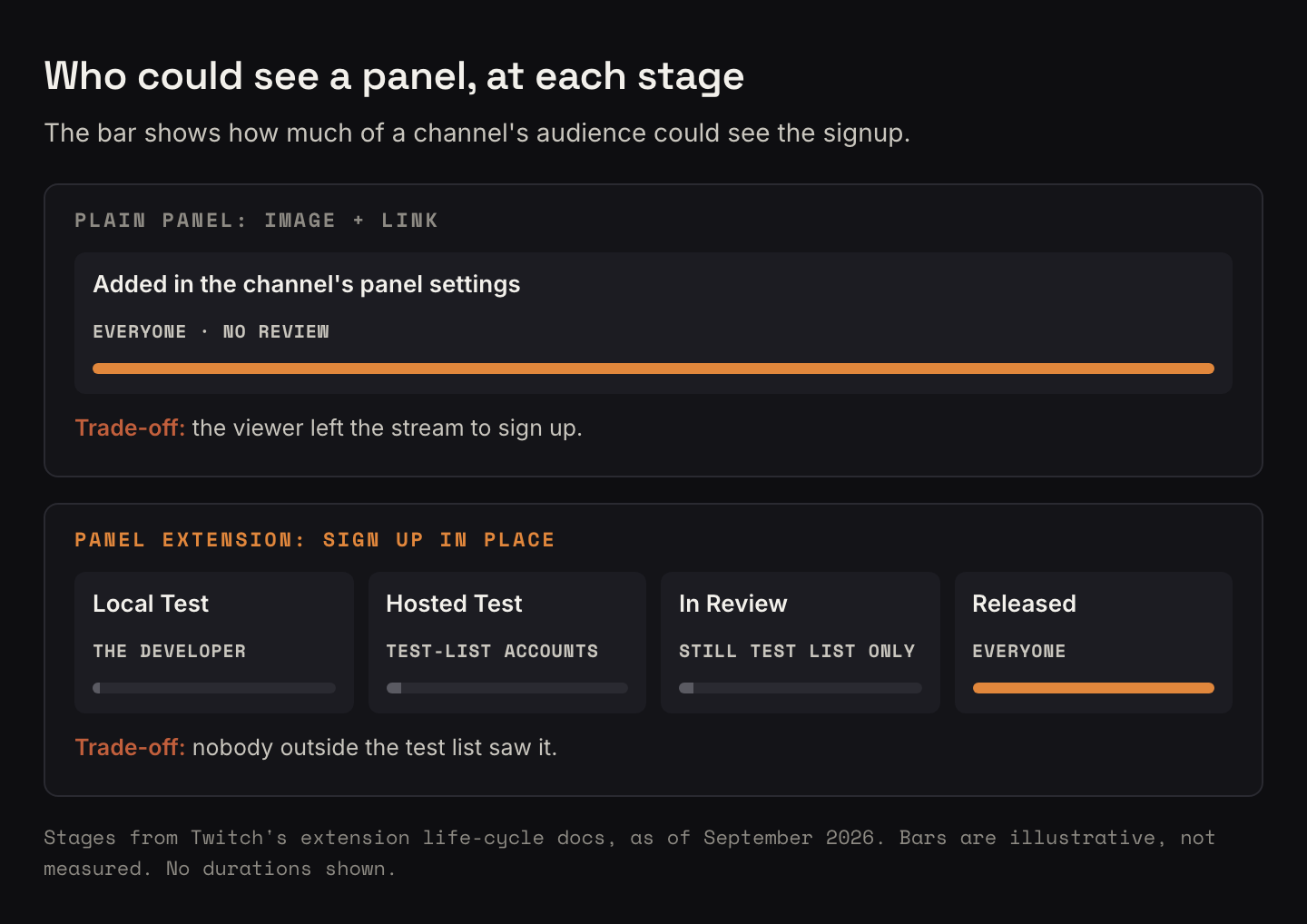
Any Twitch channel could already add plain panels under the stream: an image and a link. A panel pointing at my Laylo page would have taken about ten minutes, needed no approval from anyone, and shown up on mobile too. The catch was that the viewer had to leave the stream to sign up.
I chose the in-page version instead: stay on the stream, type a number, done. That choice is what turned a settings change into a build. Two smaller calls came with it. The form asks for a phone number first, with email one tap away. And it signs people up to the list as a whole, not to one particular release.
The ready-made widget can't run inside Twitch
Most signup services hand you a snippet to paste into your site, usually a script plus an embedded frame. Twitch set the content rules for extensions itself. Developers got allowlists for fetching data, images and media, but there was no allowlist for outside scripts, and outside frames weren't configurable at all. Both halves of a typical snippet would fail.
What did work was your own form, sending a request to a domain you had put on the fetch allowlist. So the panel became a small hand-built form: a phone field, a button to switch to email, the consent wording, and links to Laylo's terms and privacy policy.
The backend exists because the zip is public
Twitch hosted an extension's front end itself, from a zip you uploaded. You couldn't point it at your own server, and anything inside that zip could be read by anyone. Adding someone to my list takes a key for my Laylo account, and that key has to stay out of public view, so it could not ship in the zip.
That one fact is the whole reason the project has a backend. It is a small function that holds the key and passes the signup along. It ran on a free tier, so it cost $0. It was built to keep no phone numbers or emails: tests fail if a submitted number or address ever turns up in a log or an error message.
Twitch also let a panel extension use one responsive front end for desktop and mobile, so one form covered both.
An evening of code, a working backend in a week
The design went in on the afternoon of September 9, and the backend and the panel followed that evening. Nineteen of the project's 27 commits are from that one day, and it finished with 67 tests. The backend was deployed on September 14. On September 15, a test signup went through the live backend and Laylo accepted it.
Hosted Test is a preview for your test list
I had started out believing Hosted Test was the way to run my own extension on my own channel before review. Twitch's life-cycle docs said otherwise. In Hosted Test, the extension showed only to accounts on a test list you supplied, plus some Twitch staff. Everyone else saw your channel with no extension at all.
Getting it in front of real viewers meant passing full extension review.
If you are about to try this
- Price in the review queue first. Hosted Test is for testing. Real viewers see nothing until review passes.
- Put up the plain link panel on day one. It needs no review, works on mobile, and is the only thing collecting signups while the extension waits.
- Check the vendor's snippet against Twitch's extension rules before you design anything. If it needs outside scripts or frames, plan on your own form.
- Treat everything in the extension zip as public. Keys go in a backend, and the backend should do as little as possible.
- Run one real signup end to end before you submit. Passing tests and a signup that lands on the list are different evidence.
Build it yourself
What it does: lets a viewer join your mailing or drop list from a panel under your Twitch stream, without leaving the page. The parts:
- A Twitch panel extension: a plain HTML, CSS and JavaScript form with one responsive front end for desktop and mobile.
- A list service you can add people to from your own code. Mine is Laylo.
- A small backend you host, such as a serverless function on a free tier, that holds the list service's key and forwards signups.
- Consent wording and links to your list service's terms and privacy policy at the form, plus your own privacy policy in Twitch's developer console.
- A plain panel with an image and a link to your signup page, as the stopgap.
How the pieces fit: the panel sends the number or email to your backend, whose domain is on the extension's fetch allowlist. The backend confirms the request came from your channel's extension, adds the key, hands the signup to the list service, and returns a plain yes or a plain error.
Rough time and cost: my code took an evening, and the backend cost nothing to run.
If you have taken a Twitch extension through review, I would like to hear how it went.