
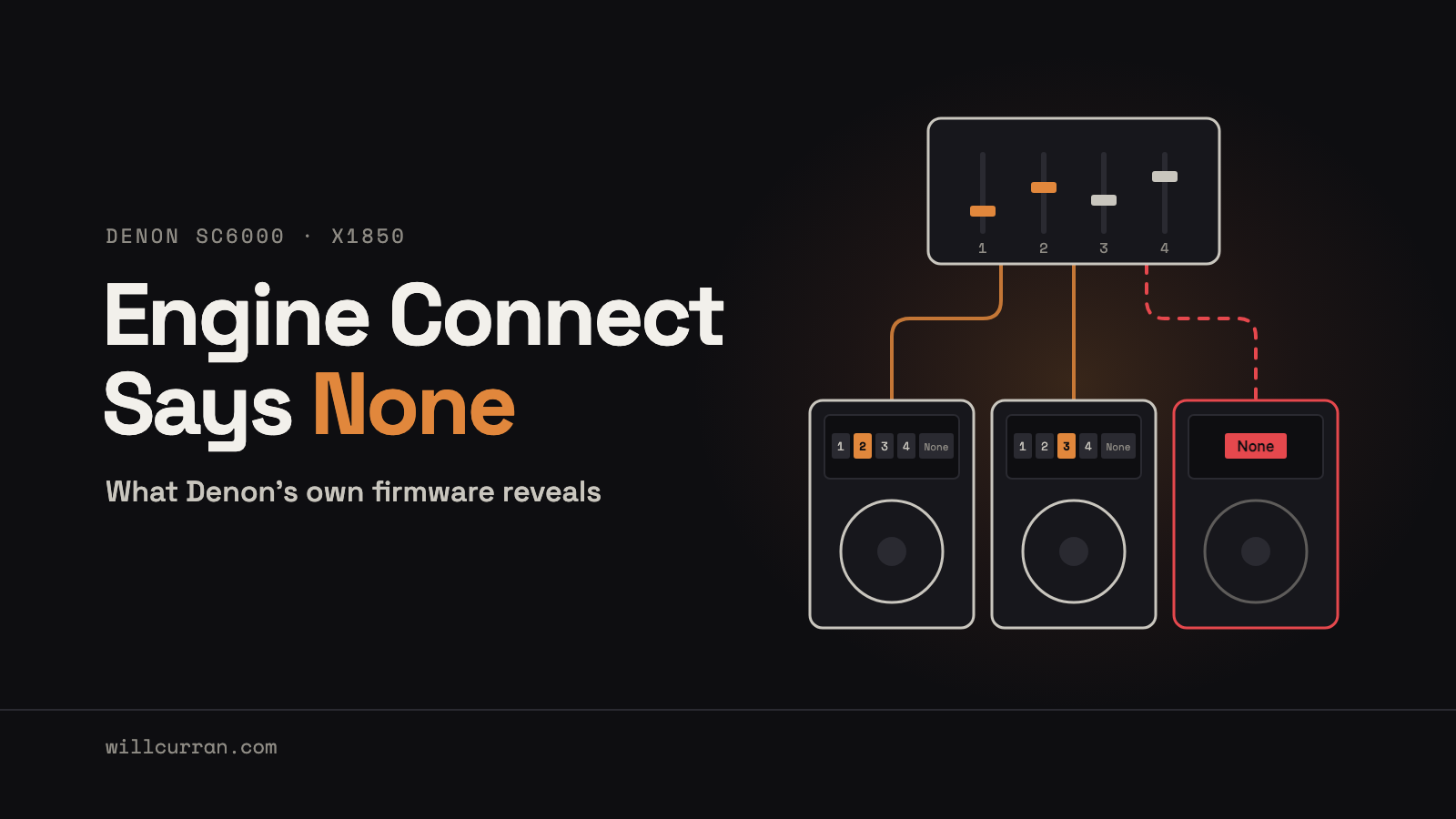
Engine Connect on an X1850 with SC6000 players can fail at random, one boot at a time. The fix that worked for me:
- Power the mixer first and let it finish booting.
- Hold the mixer's Engine Connect button and look at every player. A player whose layer rows show only "None" is stuck.
- Reboot only that player. Leave the mixer and the players that already show channels switched on.
- Repeat until it shows channel numbers. On my last run, one player needed three reboots: None, None, then channels.
The quick check: if a player can't see the other players' drives, it will show None too. Reboot that player. Unplugging and replugging its Ethernet cable did not bring it back for me.
My rig is three Denon DJ SC6000 players, an LC6000 controller and an X1850 mixer. Over three days, the Engine Connect channel menu on one player or another came up empty: no channel buttons, just the word "None". On the last day I logged thirteen boots. Five came up with channels and eight came up with None, and on the final round one player needed three reboots in a row before it worked. Nothing I changed in the settings or the cabling made a difference. What made a difference was rebooting the stuck player, and then reading Denon's own firmware to understand why that works.
This is a long post on purpose. It is written for DJs staring at the same empty menu and for the engineers at Denon and inMusic who can actually fix it. It covers what didn't work and where in the firmware this behavior lives.
Three players, four channels, and a lighting show that wouldn't start
The gear:
- 3× SC6000 (PRIME) media players, all on Engine OS 5.0.4. Their About screens show controller 00.16 and display 00.50.
- 1× LC6000 controller, display 00.49 and controller 00.23. It plugs into the left SC6000 by USB and acts as that player's Layer B. It has no network connection of its own.
- 1× X1850 PRIME mixer. Utility > Info shows firmware VERSION 1.7 and HARDWARE 1.4. As of November 2026, 1.7 is the newest X1850 firmware on Denon's download page.
Each SC6000 connects by Ethernet to the X1850's Link ports, which are a small network switch built into the mixer. For this post I number the decks the way I think about them: the LC6000 is deck 1, the left SC6000 is deck 2, the inner-right SC6000 is deck 3 and the outer-right SC6000 is deck 4.
The reason I cared so much is lighting. I run Engine Lighting, and this was my first time driving DMX fixtures (before this I had used Engine Lighting with Philips Hue). The scripted show would not run. The manual White override lit every fixture, so the DMX output, the fixtures and the patch were fine. The problem was upstream of the lights.
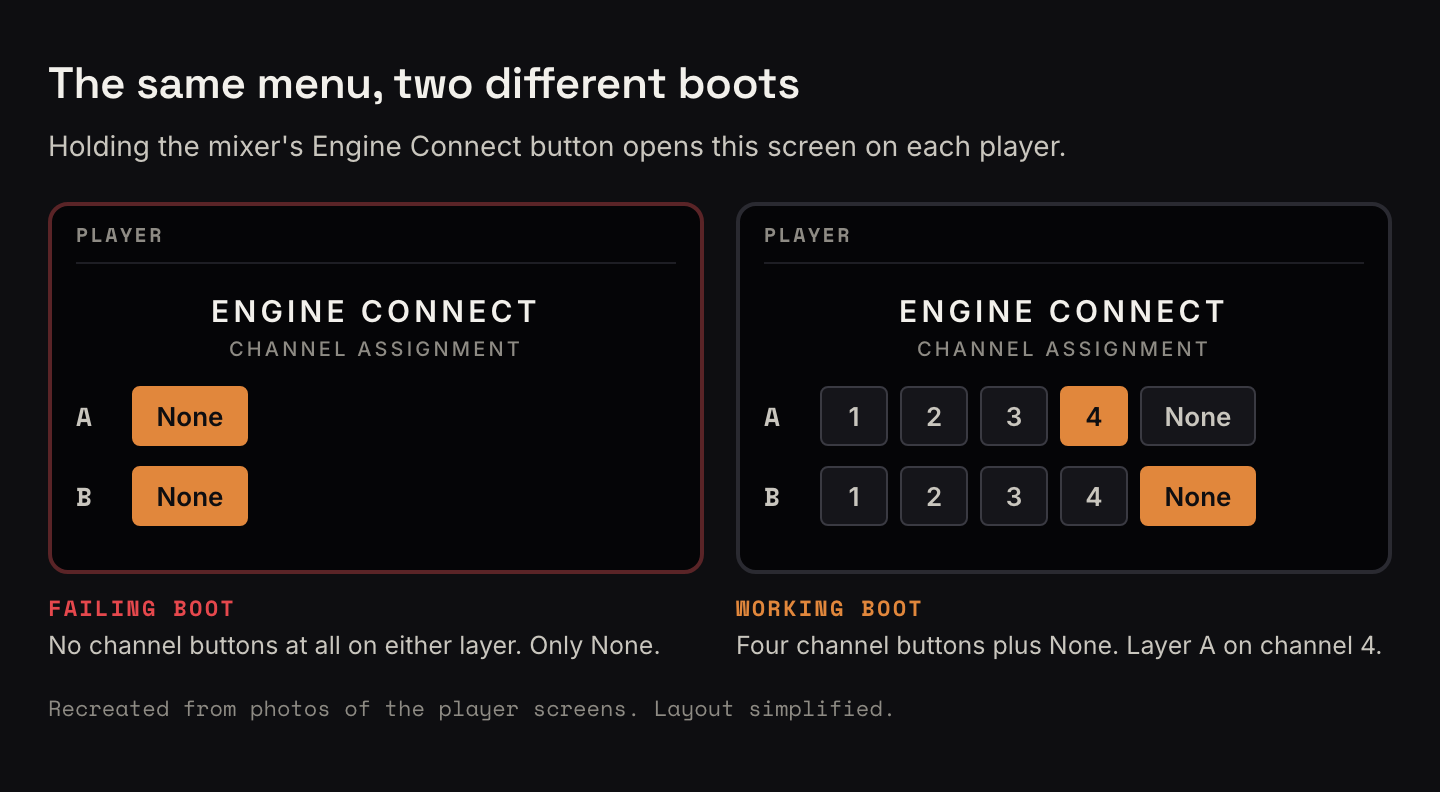
Engine Connect is how a player learns which mixer channel it is plugged into. You hold the Engine Connect button on the mixer, and each player shows a screen headed "ENGINE CONNECT" with the words "CHANNEL ASSIGNMENT". Each layer gets a row of buttons. On a working player, Layer A shows 1 2 3 4 None, and you tap the channel that deck is on. One working player of mine showed Layer A set to 4 and Layer B set to None.
On a failing player, both layer rows show only None. There are no channel buttons at all, so there is nothing to pick.
That missing assignment is what stopped the lighting. Once deck 2 finally got a channel assignment, a scripted track on it ran the lighting show correctly. From the test and from the deck firmware, my reading is that the lighting needs to know which mixer channel each deck is on, so it can follow the faders and work out which deck is live. Without an assignment, the show has no deck to follow.
Two pieces of history matter. Engine Connect has been unreliable on this rig from the start. In my own words at the time: "Engine Connect and the channel assignment has always been flaky. I think since day one." With two SC6000s and two LC6000s it was much more reliable, maybe no issues at all. It got clearly worse once the rig became three SC6000s and one LC6000. And just before all this started, I had moved the whole rig about 25 feet to a new spot.
Ten things I tried that didn't fix it
Here is everything I tried. Some of these came from forum threads where they reportedly helped other people. None of them was the answer for me.
| What I tried | What happened |
|---|---|
| My normal routine: mixer first, then each deck one at a time | Not enough on its own. Some decks still came up with None. |
| Checking cables and port LEDs, then swapping ports | Every link was up. Changing the port order didn't fix it. |
| Re-cabling so the Link port number matched the mixer channel (decks on ports 2, 3 and 4) | No fix. |
| Turning "Send Anonymous Usage Statistics" off and on, about ten times, on two decks | Fixed one deck once. Did nothing for the others. |
| Leaving that setting in different positions on different decks | In the end deck 2 had it on, deck 3 had it off, and both worked. The position doesn't matter. |
| Setting Player Number to 4 | No effect. |
| SC6000 factory reset (decks 3 and 4 on one day, deck 2 two days later) | No direct fix. |
| Stripping deck 2 to the minimum: LC6000 unplugged, a synth that was powered from its USB unplugged, Layer B off, factory reset, Engine login skipped | Still None. |
| X1850 factory reset from the Utility menu | It reset the mixer's settings. No fix. |
| Swap test: deck 2 moved onto the exact port and cable deck 4 had been working on | Deck 2 still showed None. Deck 4 worked in every port I tried. |
The usage-statistics toggle deserves a note, because it comes up in the forum threads and it nearly fooled me. It did fix one deck, once. Repeating it on the other decks did nothing, and by the end two decks were working with the setting in opposite positions.
The clue was a missing drive
The swap test made deck 2 look like a bad unit. Same port, same cable, and deck 4 worked where deck 2 failed. The easy conclusion was to blame one player and move on.
I didn't buy it. Engine Connect had been flaky since day one, and clearly worse since the rig went to three SC6000s. I bet that deck 4 would fail too, on some boot, and that the problem wasn't one broken player. The log bears that out: across my thirteen tallied boots, deck 4 came up None five times out of seven, and the supposedly broken deck 2 came up with channels on two reboots in a row later the same day.
The clue that tied it together came on a failed boot of deck 4. Besides the empty channel menu, deck 4 could not see the other player's library drive. On that boot the drive just wasn't there. Unplugging and replugging the Ethernet cable didn't bring it back. The next reboot brought back both the drive and the channel menu at once.
That told me the empty menu and the missing media were the same failure. My read is that the player's whole network session had gone wrong for that boot, and only a reboot cleared it. Channel assignment was just the most visible thing that broke.
It also explained the history. If each player has some chance of a bad boot every time the rig powers up, more players means more chances that at least one of them loses. Two SC6000s was mostly fine. Three was not.
By then I had my working theory, in the words I used at the time: "I'm starting to develop a theory that you just have to reboot them randomly." I wanted to know whether the firmware agreed. An AI assistant did the forum research with me and helped read the official firmware images, and the next two sections are what we found.
What the SC6000 firmware says about the empty menu
Denon publishes the SC6000 update image. The 5.0.4 image is listed in the source of the Engine DJ downloads page, alongside earlier versions: SC6000-5.0.4-Update.img, 182 MB.
It is an update image with a Linux root filesystem inside. The player application is /usr/Engine/Engine, a Qt/QML program of about 44 MB, and its QML screens are embedded in it as plain text. The build tag is SNAPSHOT-20260724110618, and the image targets "inmusic,jp13" and "jp14".
How the menu opens
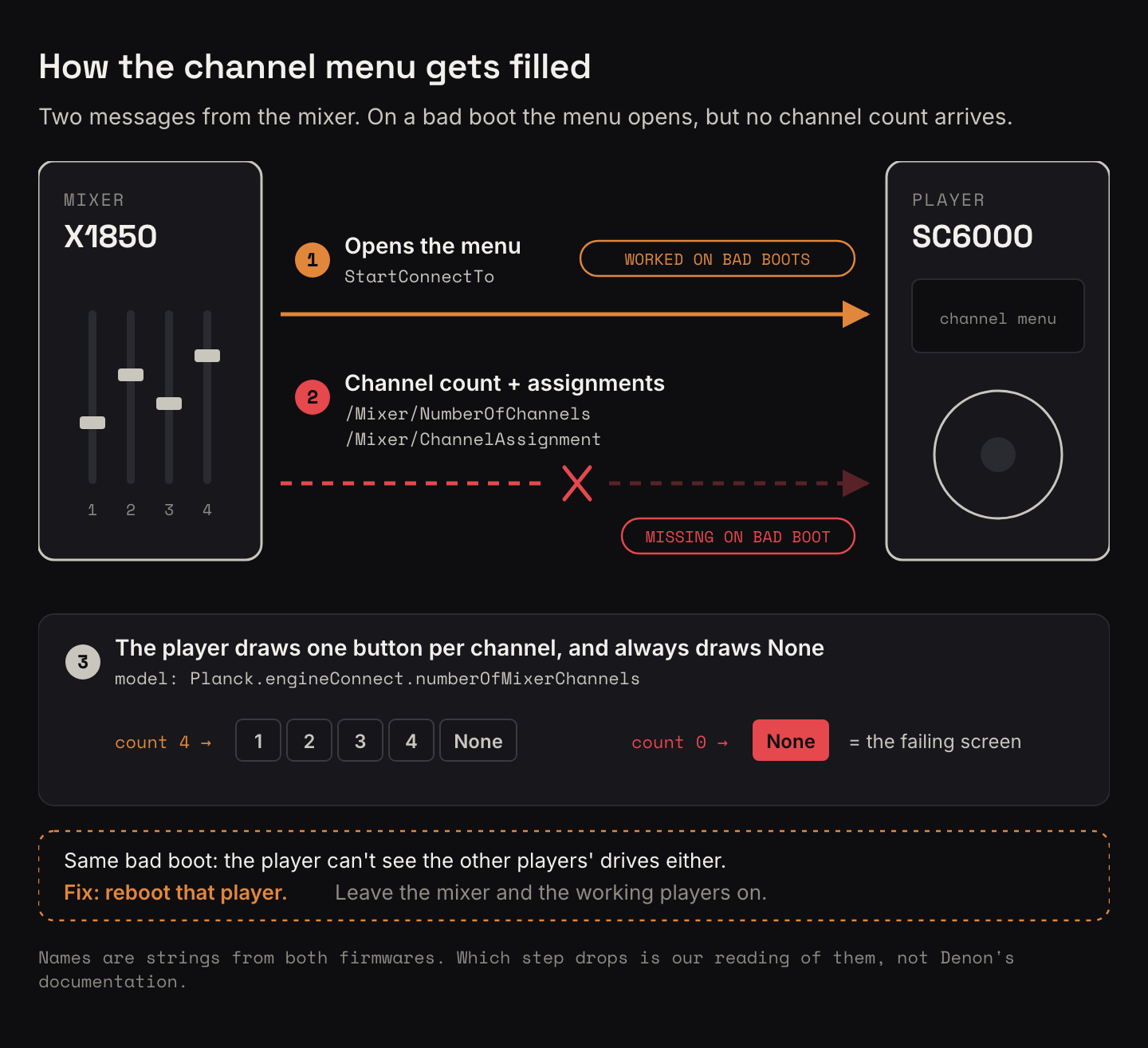
The overlay is a QML item called EngineConnect. It shows when the player's state property /Client/EngineConnect/StartConnectTo becomes non-empty. Two lines from it:
pShow: Planck.getProperty("/GUI/Scripted/ShowEngineConnect")
readonly property QObjProperty pStartConnectTo: Planck.getProperty("/Client/EngineConnect/StartConnectTo")
So the menu opening hangs on one value, set when the mixer starts connecting to the player. On my failing boots, the menu did open. That part of the conversation worked.
Where the channel buttons come from
Each layer row builds its channel buttons with a QML Repeater whose count comes from the mixer:
Repeater { id: channelRepeater; model: Planck.engineConnect.numberOfMixerChannels … }The exact line that matters is model: Planck.engineConnect.numberOfMixerChannels. The number of buttons in the row equals the number of mixer channels the player knows about. The "None" button is drawn separately, every time, with text: "None".
Put those two facts together and you get the failing screen exactly. If the player's channel count is 0, the repeater draws no buttons, and the row shows only "None". The photos of my failing players match this layout: both rows, "None" and nothing else. With a count of 4, you get 1 2 3 4 None, which is what the working players showed.
Where the assignment is stored
Each channel button reads and writes a property on the mixer's side of the shared state:
"/RemoteState/%1/RemoteProperties/Mixer/ChannelAssignment%2"Here %1 is the mixer's UUID and %2 is the channel number. The value is parsed as JSON, jState["string"], and split on a comma into <player network id>,<layer>. The player knows which assignments are its own by comparing against its /Network/NetworkId. An empty value, or a value of ",1", means the channel is unassigned:
if(assignment.length === 0 || assignment === ",1")If parsing fails, the player logs this:
console.log("[MixerChannelAssignment] Couldn't parse:", mixerChannelAssignmentState);What sits underneath
In the compiled part of the program, the C++ class EngineConnect is constructed with an airNetworkExchange::HostEnumerator, which has hostAdded, hostRemoved and hostEnumeratorEmpty. From the names, Engine Connect is built on the player's list of other devices it has found on the network. That would fit the missing-drive clue if shared drives use the same discovery, though I can't confirm that from class names alone.
The binary also contains a "Mixer Simulator", with an error message next to state names NumberOfChannels, ChannelAssignment, StartConnectTo and MixerUuid:
Wrong number of simulated mixer channels specified ( must be between 1 and 4 )So the simulator, at least, expects between one and four channels. A real channel count of zero is the state the UI handles by showing only "None".
My inference from all this: on a bad boot, the player received the mixer's message to open the menu but never received the mixer's channel count. The menu opens because StartConnectTo arrived. The menu is empty because numberOfMixerChannels is still 0. That is an interpretation, but it is the simplest one that matches both the code and the screen.
What the X1850 firmware says
Denon's official Mac updater for X1850 firmware 1.7 (updater 1.0.12, 4.3 MB) is on the Denon DJ downloads page, with a Windows version next to it. Inside is one firmware file, JM10DSP_FULL.syx: 2.45 MB of MIDI System Exclusive messages, 9,363 of them. Those messages pack a 2 MB flash image (2,097,152 bytes) with readable strings in it. The first attempts to read it came back as noise. Once it decoded properly, the strings lined up with the player side.
The same property names, from the other end
/Mixer/NumberOfChannels
/Mixer/ChannelAssignment
/Client/EngineConnect/StartConnectTo
ENGINE CONNECT
"{%02x…uuid…},%d"   (abbreviated)
The mixer holds both halves of the handshake I saw on the player: StartConnectTo, which opens the menu, and /Mixer/NumberOfChannels, which is most likely where the player's channel count comes from. The format string writes a UUID followed by a comma and a number, which matches the <player network id>,<layer> value the player parses.
The mixer also reads several things from each player: /Client/Preferences/Player, /Client/Preferences/LayerB, jog colours, /Engine/DeckN/ExternalMixerVolume, PlayState and CurrentBPM.
The mixer calls itself an X1800
The firmware contains the string DN-X1800Prime. The X1850 identifies itself on the network as "DN-X1800Prime". If you are looking at your own network and wondering why your X1850 says X1800, that is normal, and it doesn't mean you have the wrong unit.
The mixer dials the players
The networking log strings describe the architecture. Typos are Denon's, copied as they are:
[Direcotry Client]Service Info
Find statemap serer:%d
 Direcotry Client Connection timeout error
Connect_ERR
[Statemap Server while]tpcb->snd_buf == null!!!…
[Statemap Server]ptr == null
Remeining %dByte lost
 ERROR!!! BUFFER OVERFLOW!!!!
And two from the Utility side:
REFRESH IP ADDRESS
 Detect IP address change
The mixer describes itself as a "Directory Client" that finds each player's "statemap" server and connects to it. We checked one piece of that live, from a computer. The mixer announces a service on the network, but it refused a TCP connection to that service. That is consistent with the firmware: the mixer dials out to each player, and players don't dial in to the mixer.
tpcb is the name lwIP, a small open-source TCP/IP stack for embedded devices, uses for its TCP control block. Inference: the mixer runs a small embedded TCP/IP stack, probably lwIP. The firmware also has explicit error paths for timeouts, lost bytes and buffer overflows. I can't see from outside whether any of them fire on a bad boot.
"REFRESH IP ADDRESS" is the mixer utility function that forum posters use as part of their workaround. Both it and the IP-change string are in the firmware; I can't tell from strings alone what the refresh does internally.
Thirteen boots, five with channels
Here is the last day of testing, every boot I logged. "Mixer already up" means the mixer was left running while the player booted.
| # | Player | How it booted | Result |
|---|---|---|---|
| 1 | deck 4 alone | order not recorded | None |
| 2 | deck 4 alone | player first, then mixer | None |
| 3 | deck 4 alone | mixer first, then player | Channels |
| 4–6 | deck 2 alone | mixer first; player-only reboot; stripped and factory reset | None ×3 |
| 7 | deck 2 alone | player reboot | Channels |
| 8 | deck 2 alone | player reboot (feature update) | Channels |
| 9 | deck 4, with deck 2 running | mixer already up | None |
| 10 | deck 3, with decks 2 and 4 running | mixer already up | Channels |
| 11 | deck 4 (decks 2 and 3 assigned) | player-only reboot | None |
| 12 | deck 4 | player-only reboot | None, and the other deck's drive missing |
| 13 | deck 4 | player-only reboot | Channels, drive back too |
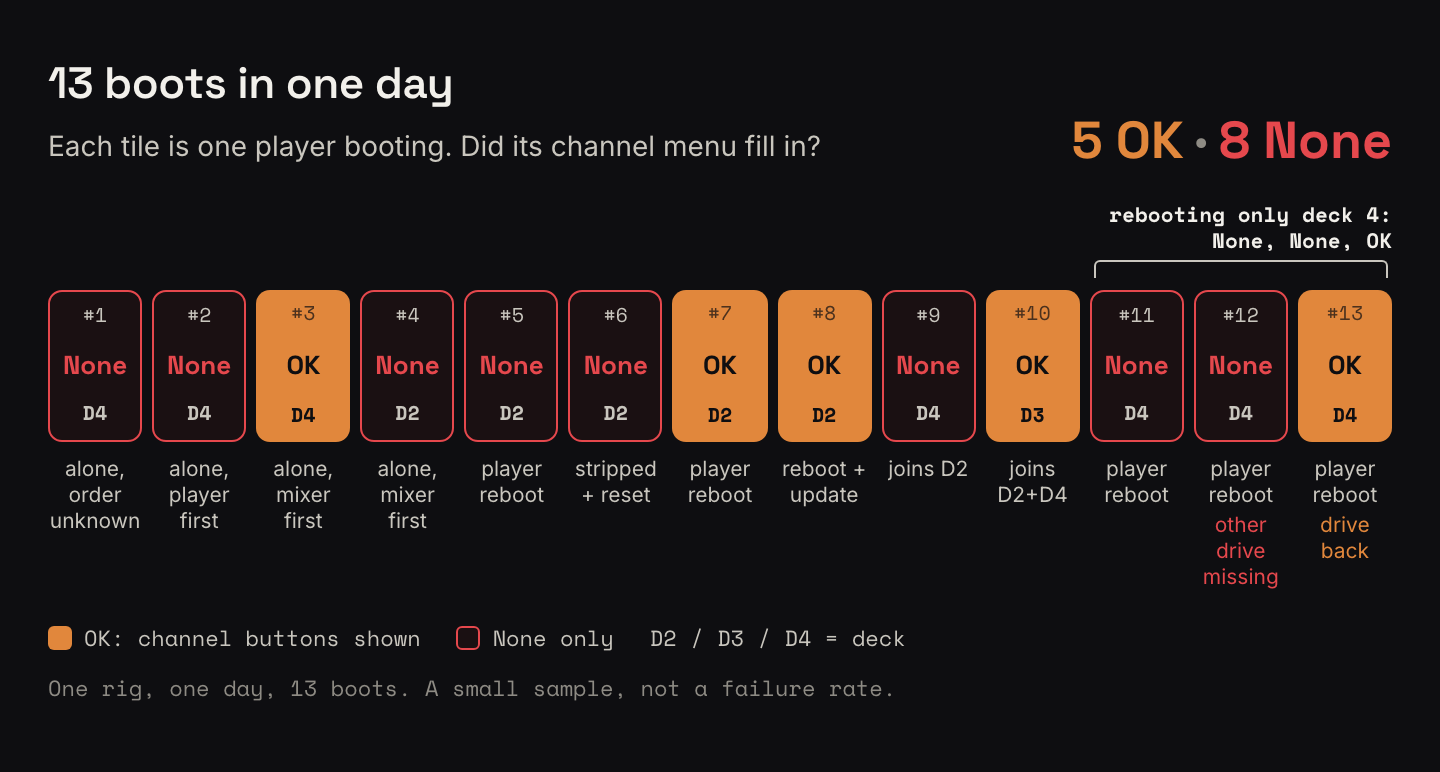
Totals: 13 boots, 5 with channels (#3, #7, #8, #10, #13) and 8 with None. At the end, all three SC6000s were assigned. Decks 2 and 3 stayed assigned while I rebooted deck 4, so rebooting one player didn't knock the others off.
Boots #2 and #3 are the only clean test of boot order I have: the same deck, alone, player first then mixer gave None, and mixer first then player gave channels. That is why the TL;DR starts with the mixer. It is one pair of boots, though, and mixer first was also my normal routine before any of this, failures included.
Boots #1 to #6 were with the rig on an isolated network, and #7 onward on a normal one. I can't tell whether that matters. Boot #3 worked while isolated, and boots #9, #11 and #12 failed on the normal network.
This is a small sample: one rig, one day, thirteen boots. It is enough to show that the failure comes and goes per boot on the same hardware and cabling. It is nowhere near enough to measure odds.

A bug report, as compact as I can make it.
Versions: X1850 PRIME firmware 1.7, hardware 1.4. 3× SC6000 PRIME on Engine OS 5.0.4 (controller 00.16, display 00.50). 1× LC6000 (display 00.49, controller 00.23) on USB to one SC6000 as Layer B. All players wired directly to the X1850 Link ports.
Repro: power the mixer, then the players. Hold Engine Connect on the mixer. Repeat across power cycles.
Observed: per boot, a player shows the ENGINE CONNECT / CHANNEL ASSIGNMENT overlay with only "None" on both layers, which matches numberOfMixerChannels = 0 while StartConnectTo has arrived. On the same boot, that player can't see other players' shared media. Replugging Ethernet doesn't recover it. Rebooting only that player does, after one to three tries in my log. 8 of 13 logged boots failed. Players that fail on one boot work on another with no changes. All link LEDs are up throughout.
Expected: every player shows channels 1 to 4 plus None on every boot.
Not the cause on this rig: port or cable (swap test), Link port number matching the channel, Player Number, the usage-statistics setting, player or mixer factory reset, LC6000 or other USB devices, Engine account login.
Hypotheses, unconfirmed from outside:
- A race between the player's network services starting and the mixer's directory client discovering it.
- Player-side state stuck for that boot, given that the whole session fails (media sharing included) and only a player reboot clears it.
- Mixer-side connection or buffer limits with three players. The firmware has explicit timeout, lost-byte and buffer-overflow error paths.
The failure gets clearly worse going from two SC6000s to three, which fits a per-player chance of a bad boot.
Where I was the bottleneck
A lot of those three days went into reboots and theories that died:
- The cables, after the move. Every link light was up, and the swap test cleared the port and cable.
- Port number equals channel. A forum rule of thumb. Re-cabling to match did nothing.
- Player numbers. Setting Player Number to 4 changed nothing, and a forum thread reports the same.
- The usage-statistics toggle. The one that almost stuck, because it fixed one deck once. I spent about ten cycles on it across two decks before the final state proved it irrelevant.
- A bad player. Deck 2 looked broken for most of a day, then worked twice in a row.
- The network. I couldn't confirm it either way. The tally has boots that worked and boots that failed on both kinds.
The boot tally only covers the last day, which is why it has thirteen rows and boot #1 has no recorded order. Counting from the first failure would likely have shown the per-boot pattern sooner, with less time spent on toggles.
The firmware reading was useful, but it has limits. It explains why the screen looks the way it does, and it shows where the handshake lives on both ends. It doesn't show which side drops the channel count on a bad boot. Only Denon can see that.
If you are about to try this
- Check the menu right after power-up. Hold Engine Connect as soon as everything is booted, before anything else depends on it. A player showing only "None" needs a reboot, not a settings change.
- Use the drive check. If a player can't browse another player's drive, it is on a bad boot. Reboot it. Don't bother replugging Ethernet.
- Reboot only the stuck player. In my log, rebooting one player didn't knock the already-assigned players off.
- Bring players up one at a time. My routine now: mixer first. Then the player with the library drive, alone, rebooting until it shows channels. Then the next player, rebooting until it shows channels, then the next. This is a sensible routine, not a proven one. I have no evidence that the order changes the odds, only that it makes each failure easy to spot and fix.
- Count your boots. Write down every boot and its result. It turns a flaky feeling into a number, and it stops you crediting a toggle for what a reboot did.
- Note your versions before you contact support. Player Engine OS, controller and display versions from the About screen, and mixer firmware and hardware from Utility > Info.
Sources
The forum threads below are reports from other users, started between 2021 and 2025. I found no official fix from Denon in any of them.
- Engine Connect not working with SC6000/X1850: the source of the usage-data toggle, plus the mixer's refresh IP address and repeat trick. Also an LC6000 user who reports fixing it by moving the SC6000 to Link port 2 and holding Engine Connect, and a debate about boot order.
- Engine connect channel assignment working on only one player: one player shows channels, the other none. Powering the players first and the mixer last is reported to help, which is the opposite of my one clean pair of boots.
- X1850 Channel Assign Issues: four players. The only way reported to get all of them assigned was refreshing the IP and rebooting the stuck player repeatedly. That is the closest match to what I saw.
- X1850 Mixer isn't assigning media player ports: Link port numbering counted from the back, and a suspected failing mixer switch.
- Conection LC6000, SC600 and channels: the port-number-matches-channel rule of thumb, and the LC6000 layout.
- Automatically Loading Player Number on Startup: player numbers reverting at startup.
- X1850 SC6000 (brand new) engine connect wont work: setting player IDs to match ports reportedly made no difference.
- What's the latest firmware for the mixer X1850?
- Engine DJ knowledge base: players not getting the right player number after Engine DJ v2
- SC6000 PRIME User Guide v1.5, which documents the Send Anonymous Usage Statistics setting.
- Engine DJ downloads and Denon DJ downloads, for the official SC6000 5.0.4 image and X1850 1.7 updater.
I'd still like a real fix, and I hope someone at Denon reads this far. Until then, rebooting the stuck player is what got my lights running. If you have seen this on your own rig, especially if you found something that changes the odds, reply and tell me about it.